Hide Cloud Drive2.1.0.4
Publisher Description
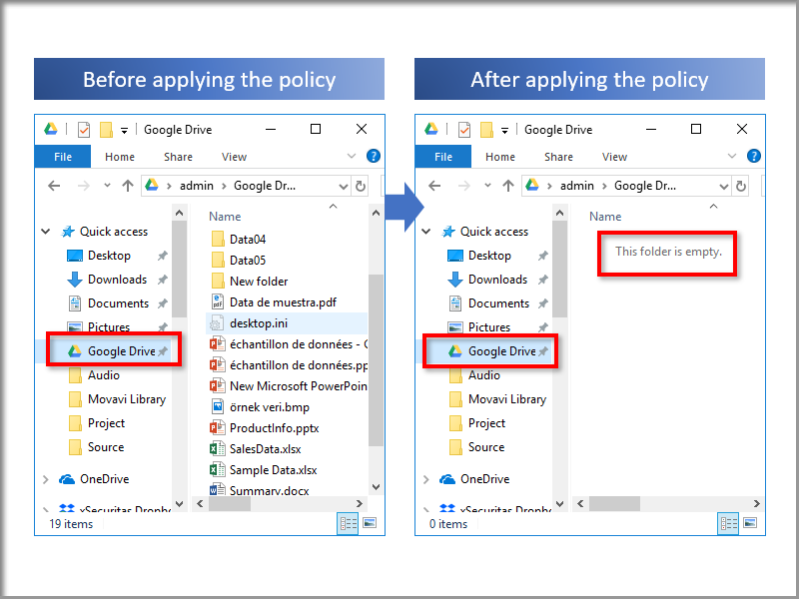
Do you want to protect your cloud sync folder safe?
Do you want to keep your cloud sync folder data safe while you are away from your PC? This 'Hide Cloud Drive' product hide sync folder and Tray Icon of cloud drive. It also protects your files by hiding the Desktop, Documents and Pictures folders.
Features
* You can apply the 'Deny Access' or 'Read Only' policy for the selected cloud drives.
* When 'Deny Access' policy is selected, the cloud sync-folder is inaccessible and the Tray Icon and shortcut disappear. As a result, others can not access Cloud Drive.
* You can also apply 'Deny Access' or 'Read Only' policies to the Desktop, Documents, Pictures folder.
* This applies to the Cloud Drive displayed in Explorer, not to Cloud in the Web Browser.
* If you change the Cloud Sync Folder while running the application, the application will control all Sync Folders before and after the change. After rebooting, only the changed Sync Folder is controlled.
Support Cloud Drive
* Google Backup and Sync
* Google Drive File Stream
* DropBox
* Microsoft OneDrive
* Box
* Amazon Drive
Related Videos
* Quick Guide: https://youtu.be/iO4lZAyiic4
* Tutorial: https://youtu.be/fbOim1u6rlc
* See more videos: https://www.youtube.com/channel/UCW9UHqHn07a5Tk_L2bmsXyw
Operating System
* Windows 7 / 8 / 8.1 / 10
* Windows Server 2008 R2 / 2012 / 2016 / 2019
About Hide Cloud Drive
This Access Control program is available in English, ChineseSimplified, Dutch, French, German, Hindi, Japanese, Korean, Portuguese, Russian, Spanish, Turkish. It was last updated on 29 September, 2026. Hide Cloud Drive is compatible with the following operating systems: Windows.
The company that develops Hide Cloud Drive is xSecuritas, Inc. The latest version released by its developer is 2.1.0.4.
The download we have available for Hide Cloud Drive has a file size of 21.0 MB. Just click the green Download button above to start the downloading process. The program is listed on our website since 2019-04-27 and was downloaded 7 times. We have already checked if the download link is safe, however for your own protection we recommend that you scan the downloaded software with your antivirus. Your antivirus may detect the Hide Cloud Drive as malware if the download link is broken.
How to install Hide Cloud Drive on your Windows device:
- Click on the Download button on our website. This will start the download from the website of the developer.
- Once the Hide Cloud Drive is downloaded click on it to start the setup process (assuming you are on a desktop computer).
- When the installation is finished you should be able to see and run the program.
Program Details
General
System requirements
Download information
Pricing
Version History
version 2.1.0.4
posted on 2019-04-27
ver 2.1.0.4
- Changed to be able to install in any area of PC
- Changed some language packs
